Blogia

imoteacher

THE END: MY DREAM LESSON
THE END: MY DREAM LESSON

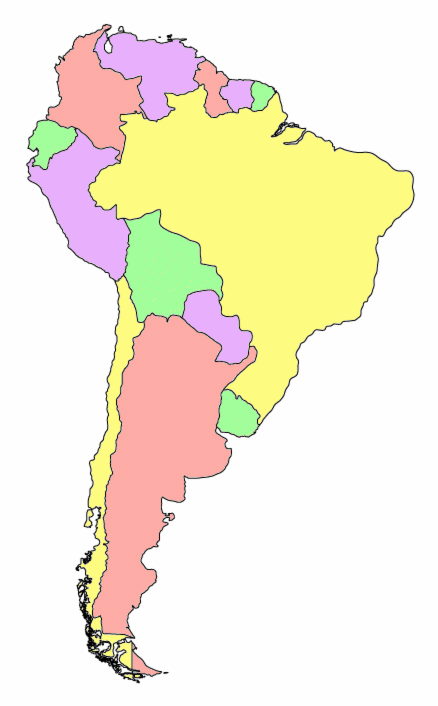
Teaching guide- Which country is the best?


Objectives Using the web to find information for countries in southamerica 


 Understanding basic statistics about countries 

 Skimming and scanning web pages for information 

 Using Excel to make a simple chart 

 Analizing/ interpreting information

 Google 

Applications

  • Internet  Explorer

  • Excel 

  • Glogster

Procedure

1.       Clarify vocabulary of superlatives

2.       Discuss and clarify vocabulary of various statistics 

3.       Students use Excel to create charts of their data  

4.       Students transfer the information contained in their charts and design a poster using Glogster. The teacher gives them a glogster template to work on, you can find it here: http://mvvaldivia.glogster.com/glog-5094/  

5.       Students check their information in the poster with a powerpoint prepared by the teacher on this subject using Glogster. The group with the least mistakes and/or with more correct answers will receive a motivating “point” for the coming test.  You can find the powerpoint here: http://www.mediafire.com/file/655b1iepmishulu/6-WHAT%20IS%20THE%20LONGEST%20MOUNTAIN%20CHAIN%20IN%20THE.ppt

Evaluation Students will be requested to locate a website and do the online test therein. Then they should print their answers http://www.tolearnenglish.com/exercises/exercise-english-2/exercise-english-9678.php Extension Students play a game online. They will find it in the following website: http://genkienglish.net/milliondollars.htm


LESSON 23

LESSON 25/ MY DREAM LESSON

Reasons for Integrating Technology
When effectively carried out, technology has a very positive impact on student learning and a long-lasting impronta on their learning mental maps. It can:
  1. Increase student motivation for learning
  2. Improve communication of learning goals
  3. Facilitate higher-order thinking skills
  4. Build valuable skills that students will use in their lives

Technology Changes the Way Students Learn
Students still learn by comparing new information with previously acquired knowledge and by contrasting newly-acquired skills with existent ones. Nevertheless, students today have different preferences to process information: because today there is an enormous amount of tools available to the learner.

Activities for All Classrooms
There are literally thousands of ideas for using technology in the classroom. Online tools can be used for collaboration; the Internet provides information; and multimedia tools allow teaching to be both educational and entertaining.

Find below some suggestions on how to integrate technology so as to upgrade your classes to a 2.0. level

  • Create a Class Blog_ A blog is an excellent way to communicate with your students. You can include course information, assignments, lecture notes and presentations, links to interesting sites, challenges, study tools, links to textbook Web sites, and many other features.
  • Take Part in a Web Event— Using chat room technology or streaming video is exciting to both students and educators. Students can often ask questions and can read (or hear) what other students ask.
  • Create a webquest— Engage students in Internet-based tasks that require higher-order thinking skills. You can apply one of the many teacher-created WebQuests ready for your use.
  • Visit Your Textbook Web Site— Many publishers offer companion Web sites to go with textbook study. They offer websites with extensive resources as a supplement to the textbook program, including tools for self-study, chapter summaries and links, video clips, and interactive activities.
  • Participate in an Online Research Project—The Internet is filled with ongoing projects that allow students to contribute by collecting, submitting, and analyzing data, submitting ideas, or contributing work online.
  • Have Students Create a Multimedia Presentation—Ask students to use various digital media, such as digital video clips, audio clips, and digital photographs to assemble a multimedia presentation. 

But before you get started, don’t forget to:

  • Align lessons with the class contents.
  • Familiarize yourself with the technology before using it in the classroom.
  • Be prepared with a back-up lesson in case technology malfunctions!!!!!!

LESSON 24

LESSON 22

TRY IT OUT: LESSON 21/ INTEGRATING TECHNOLOGY

When Technology is the topic, I think it is useless if you do not use it as stimuli to instantiate a response from our students. So, from that perspective. I like to use technology as a means to arise debate over a controversial topic. This is one ficticious example of how I do to engage students in online activities.

http://mvvaldivia.glogster.com/accident-glog/

However, last week we had a problem with the university chatroom, so we decided it to do it through skype with a maximum of 9 participants each time. To be honest, the idea was not mine, but one of my students’. He told me that when I ask them to write a dialogue, they use this tool not to alter family weekend. They agree on a certain time and comply with the homework.

It made me think that to be a XXI century teacher, you have to go with the times not behind.

TRY IT OUT: LESSON 19/ USING SOCIAL NETWORKS

The value of social networks within an academic environment cannot be underestimated. The Internet generation is engaged with technology.

In Chile, 96% of students reported using social networks but only 20% reported using them to talk about educational subjects. Therefore, 70% prohibited blogging, online discussion boards or any social networking sites at school. In most of them, for example, Facebook is blocked.

At the same time, only 15% of parents felt that social networks could conceivably improve their children’s reading and writing. most of them thought that, on the contrary, it affected both their writing and their social appropriacy greatly.

All this evidence of a disconnect among the participants in education (teachers, students and parents) presents a paradigm shift that needs to be clarified first. Placing it inside the college firewall would enhance its value dramatically while reducing concerns about the potential downside of these networks - cyber bullying, frivolous chat, use of explicit language, pictures or even inappropriate music. But still we have to see a lot of water flowing under the bridge.

TRY IT OUT: LESSON 20/ USING AN E-PORTFOLIO

As Chile is still in the threshhold of becoming a developed country,  not everyone has access to a PC at home, a broadband connection and the computer literacy to engage in online activities.


According to national statistics, In Chile there is, at least, one mobile phone per person. Therefore, I can see the application of mobile phones, particularly those with cameras to be used for documenting students' work and achievements.

Besides, the teacher can make up short instructional videos which he may distribute to the student on a mobile phone memory card and allow them to work independently.

At the end of the semester, these activities can be saved in a file in the form of an e-portfolio

TRYING OUT: LESSON 18/ MAKING PODCASTS WITH STUDENTS

I HAVE DOWNLOADED FOUR PODCASTS FROM

http://www.manythings.org/e/podcasts.html

and I have created the powerpoint which I have uploaded at:

http://www.mediafire.com/?6idvrf9f05d1ndb

I hope you enjoy it!

LESSON 17

TRY IT OUT: LESSON 16/MY WIKI PROJECT

In the link below, I have left an open question for my students to investigate and to contribute. They would have to research on different causes causing vessels to capsize. Once they determine the cause, they would have to illustrate it with one example, indicating why, when, where, what type of cargo/vessel it affected, etc.


http://imoteacher.pbworks.com/w/page/32879449/capsizing


LESSON 15

LESSON 14

TRY IT OUT: LESSON 13/ USING SOCIAL BOOKMARKING WITH STUDENTS

Diigo lets you do more than just bookmark web pages online. For instance, if you install the Diigo toolbar, or toolbar button, you have the ability to highlight text and pictures in a variety of colors, or add sticky notes to a bookmarked page. With this feature you can annotate web pages with thoughts, ideas or additional information. All these notes are saved for the next time you access the saved bookmark, and anyone else you share the bookmark with, (students or teachers), will also see your annotations.

Diigo lets you take screenshots of bookmarked pages to visually remind yourself of the page content, and archive the page so that if the content changes, or is removed, you will always have the original page that you bookmarked. Saved sites can be tagged for easy searching, organized into lists, or presented as a slideshow. Your Diigo bookmarks can be public, or private, and there are numerous options for sharing with individuals, groups or social networking sites like Twitter or Facebook. A recent iPhone App will even allow you and your students to access stored bookmarks on an iPod Touch in the classroom. With the iPhone app you can download bookmarks for offline browsing. So, you really can achieve a lot by using social bookmarking in education.

Teachers can start by bookmarking an appropriate web site or reference article and highlight it to focus on the main ideas. They can use the sticky notes to add comments to emphasize the things being discussed in class. Also, a sticky note can be added that asks a question to solicit responses from students.

When students access the web page using the provided url, they will see the information and teacher annotations. Students can then add their own comments and answer any questions left by the teacher.

LESSON 12

LESSON 11

TRY IT OUT: LESSON 10/ MY WEBQUEST LESSON

TRY IT OUT: LESSON 9/ MAKING INTERACTIVE EXERCISES

TRY IT OUT: LESSON 8/ USING ONLINE VIDEO ONLINE

STAGE ONE: PREPARATION

  • Select vocabulary from videos.
  • Present the learners with the words prior to playing the video clip, and allow them to use context clues from the video to determine the meaning before providing them with the definition.

STAGE TWO: COMPREHENSION

  • Provide students with questions prior to watching the video, and ask them to use their listening skills to discover the answers.
  • Instruct students to write down all the nouns, verbs, adjectives or adverbs that they hear in a section of video.
  • Using Past tenses (simple, continuous, perfect) to report the situation seen in the video

 STAGE THREE: TRASFERENCE

  • Use the video to give students an opportunity to speak about ways to avoid an accident at work
  • Students must speak about their own experiences regarding personal safety

The video I will use for this exercise can be found at:

http://www.osha.gov/dts/maritime/video/shipyard_accidents.html

TRY IT OUT: LESSON 7/GLOGSTER HOLIDAY POSTER

I have been teaching comparatives and superlatives. So I will be creating a poster with the region’s attractions. So as to sensibillize them with the continent they live in: